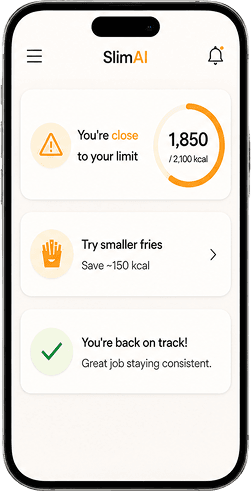



 featurePhoto Calorie Tracker
SlimAI Photo Calorie Tracker (Camera Scan) for Real-Life Meals
SlimAI Calorie Tracker helps you use Camera Scan to log meals, review calories, and understand food details when typing feels too slow.
Real meals are not always easy to type: mixed plates, restaurant food, homemade portions, sauces, toppings, and uncertain ingredients can slow calorie tracking down.
SlimAI Calorie Tracker's Photo Calorie Tracker (Camera Scan) helps you scan a meal, see initial results in about 5 seconds, review calories, edit ingredients, adjust servings, and connect the entry with Macro Tracker, Food Health Score, and progress.
Eat smarter, not stricter.
Last updated

3-day free trial · Cancel anytime · No card charged during trial
How to Count Calories From a Food Photo
Counting calories from a food photo is not only about image detection. The real problem starts when the scan needs to match what you actually ate.
A meal can include mixed ingredients, hidden oils, sauces, toppings, custom portions, or preparation details that are not clear from the photo alone.
A useful photo calorie tracker should help you start faster, then give you a clear way to review, adjust, and save the meal with more control.
What Makes SlimAI Calorie Tracker's Photo Calorie Tracker Different
SlimAI Calorie Tracker's Photo Calorie Tracker (Camera Scan) is built for what happens after the scan.
A basic AI food scanner or food scanner calorie app may help you identify visible food, but SlimAI connects Camera Scan with Ingredient Editing, Serving Size Guidance, Macro Tracker, Food Health Score, and Progress, Streaks & Back-Date Logging.
The scan gives you speed. The review flow gives you clarity before the meal becomes part of your daily progress.
Ready to try Photo Calorie Tracker?
Snap a photo and SlimAI does the rest — 10K+ downloads on iOS and Android.
3-day free trial · Cancel anytime · No card charged during trial
How SlimAI Calorie Tracker's Photo Calorie Tracker (Camera Scan) Works
SlimAI Calorie Tracker's Photo Calorie Tracker (Camera Scan) works through one connected flow: scan, review, understand, adjust, and track. Camera Scan starts the food entry, while SlimAI's connected features help you turn the photo into a more useful calorie log.
Camera Scan
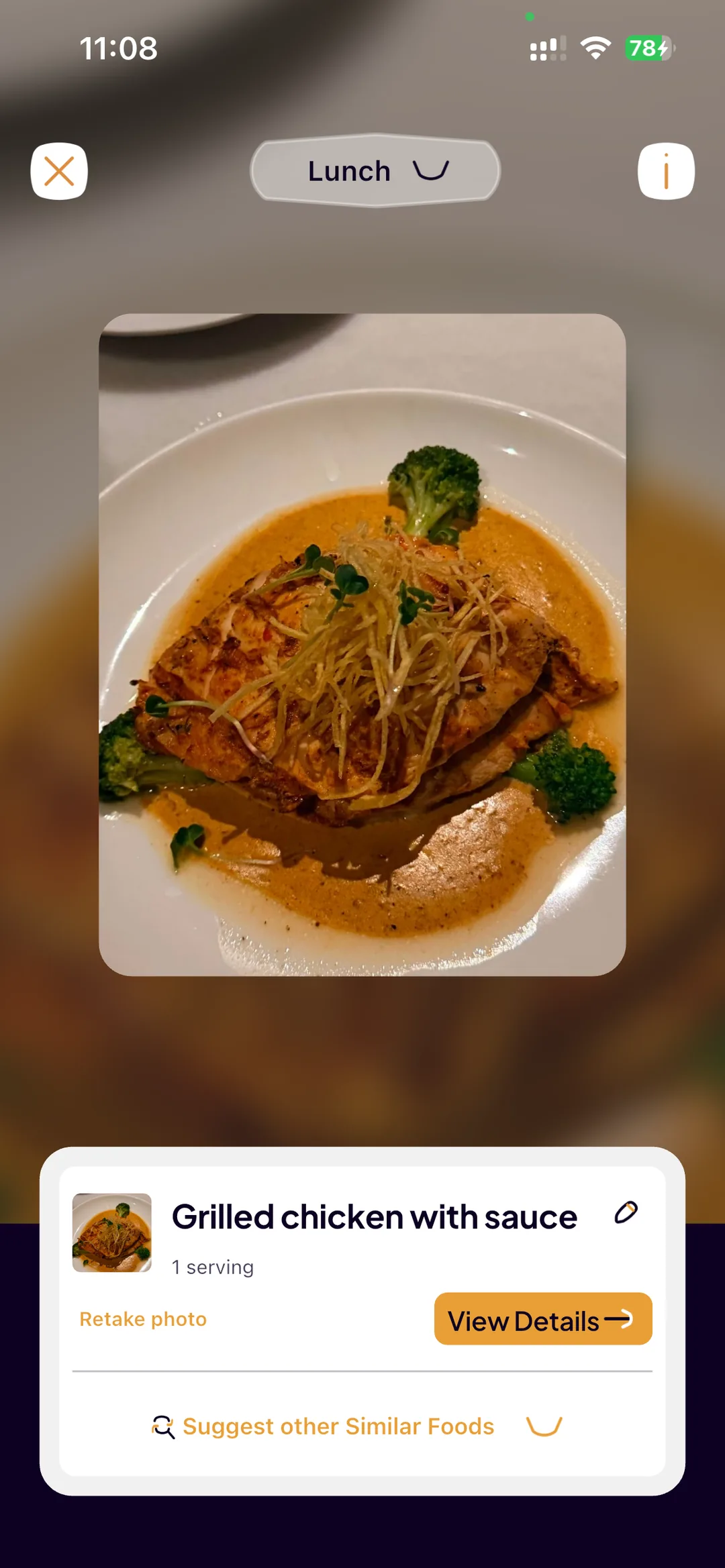
Camera Scan lets you take a meal photo and start a food entry from the image. SlimAI can show initial scan results in about 5 seconds, helping you move from food photo to calorie review faster. Camera Scan is the starting point, not the final answer. You can review what SlimAI detected before saving the meal.
Gallery Upload
Gallery Upload helps when you already have a food photo saved. You can upload the image and use the same scan, review, and edit flow. This keeps Photo Calorie Tracker useful when you took the photo earlier but did not log the meal at that moment.
Calorie Review
After Camera Scan or Gallery Upload, SlimAI shows calorie-related information for the scanned meal. You can review the entry before saving it as breakfast, lunch, dinner, or snack, and see how the meal fits your calorie goal.
Macro Tracker
Macro Tracker adds protein, carbohydrates, and fats to the scanned meal. This gives your photo entry more context than a calorie number alone, so you can understand how the meal supports your food awareness, weight goal, or fitness routine.
Food Health Score
Food Health Score helps you understand food quality after the scan. Calories show energy value, while Food Health Score gives another signal for daily food decisions, helping you understand what you are eating, how much you are eating, and how the meal fits your goal.
Serving Size Guidance
Serving Size Guidance helps you review the portion after Camera Scan. If the detected serving does not match what you actually ate, you can adjust the serving before saving the meal. This matters because calorie estimates depend on photo clarity, portion size, visible ingredients, and cooking method.
Ingredient Editing
Ingredient Editing gives you control when Camera Scan misses something. You can add or remove ingredients if the result does not match your actual meal. This is important for hidden oils, sauces, toppings, extras, and ingredients that may not appear clearly in the photo.
Progress, Streaks & Back-Date Logging
Progress, Streaks & Back-Date Logging connects scanned meals with your longer-term routine, supporting meal history, calorie patterns, progress graphs, and consistency. Back-Date Logging also helps when you took the food photo earlier but forgot to log the meal at the time.
A Note on Photo Calorie Estimates
Calorie estimates from Camera Scan depend on photo clarity, portion size, visible ingredients, and cooking method. Hidden oils, sauces, and preparation details can affect the estimate. SlimAI Calorie Tracker helps users review and adjust entries through Serving Size Guidance and Ingredient Editing.
Clear photos can improve estimate quality when lighting, angle, and plate visibility make the food easier to review.
Ingredient Editing is available when Camera Scan misses extras you know were in the meal, such as sauces, oils, toppings, or added ingredients.
Why Use a Photo Calorie Tracker for Real Meals
Photo Calorie Tracker (Camera Scan) is built for real-life meals, the ones that slow manual tracking down.
Faster food entry when typing slows you down
Camera Scan can show initial results in about 5 seconds, helping you start a meal log faster when typing every food item would take too long.
Better support for real-world meals
Photo Calorie Tracker helps when ingredient lists, portions, sauces, or preparation details are unclear or unavailable.
More control after scanning
Ingredient Editing and Serving Size Guidance let you refine the result instead of saving a scan that does not match what you ate.
Connected tracking beyond the scan
Photo-logged meals connect with Macro Tracker, Food Health Score, and Progress, Streaks & Back-Date Logging so one scan supports the full routine.
Who Should Use a Photo Calorie Tracker App
Photo Calorie Tracker fits the moments when a meal is easier to photograph than to describe.
Users eating out
Camera Scan helps when a meal has unknown ingredients, no menu macros, or unclear portions. SlimAI Calorie Tracker helps you scan the meal, review the entry, and adjust hidden oils, sauces, or toppings with Ingredient Editing.
Users logging home-cooked meals
Photo Calorie Tracker helps when a full plate takes too long to enter item by item. SlimAI Calorie Tracker helps you scan the plate, adjust the portion with Serving Size Guidance, and edit ingredients before saving.
Users tracking snacks or mixed meals
Camera Scan helps when a food entry is hard to estimate visually. SlimAI Calorie Tracker helps you move from photo logging to calorie review, Macro Tracker, Food Health Score, and progress.
Users comparing the best photo calorie tracker options
SlimAI fits when you want scan, edit, macro review, food quality context, and progress in one place. SlimAI Calorie Tracker gives you more than scan-and-save tracking.
More From SlimAI Calorie Tracker
Photo Calorie Tracker (Camera Scan) stays connected to the features that make a scanned meal more accurate and more useful.
Ingredient Editing
Helps you correct what Camera Scan missed, including hidden oils, sauces, toppings, or ingredients that are not clear in the photo.
Serving Size Guidance
Helps you adjust the portion after scanning so the meal entry better reflects what you actually ate.
Macro Tracker
Adds protein, carbohydrates, and fats to photo-logged meals so calorie tracking does not stop at one number.
Food Health Score
Adds quality context to scanned meals when you want more than calorie information alone.
AI Calorie Tracker
Connects Photo Calorie Tracker (Camera Scan) with the broader SlimAI food logging and calorie review system.
Explore More SlimAI Features
 FAQ
FAQ
Still Wondering About SlimAI
 Can an app estimate calories from a photo?
Can an app estimate calories from a photo?Yes. A photo calorie tracker can use a food image to generate calorie-related information from visible food details. SlimAI Calorie Tracker's Photo Calorie Tracker (Camera Scan) helps users scan meals, review calories, and check nutrition context, but estimates depend on photo clarity, portion size, and visible ingredients.
How accurate is photo calorie tracking?
How accurate is photo calorie tracking?Photo calorie tracking can be useful, but it is not exact for every meal. Accuracy depends on photo clarity, portion visibility, cooking method, and hidden extras like oils and sauces. SlimAI Calorie Tracker helps users adjust entries with Serving Size Guidance and Ingredient Editing before saving the meal.
Can SlimAI scan restaurant food?
Can SlimAI scan restaurant food?Yes. SlimAI Calorie Tracker's Photo Calorie Tracker (Camera Scan) can support restaurant meal logging when you take a clear food photo. You should review the result and use Ingredient Editing when sauces, oils, toppings, or hidden ingredients are not visible in the image.
Can SlimAI scan homemade meals?
Can SlimAI scan homemade meals?Yes. SlimAI Calorie Tracker can support homemade meal logging through Camera Scan and Gallery Upload. You can scan a fresh plate or upload a saved food photo, then review the entry with Serving Size Guidance and Ingredient Editing before saving calories and macros.
Can I edit the result after scanning?
Can I edit the result after scanning?Yes. SlimAI Calorie Tracker lets you edit the result after Camera Scan. Serving Size Guidance helps you adjust portions, while Ingredient Editing lets you add or remove ingredients. Review the entry before saving so the food log better matches what you ate.
What should I do if my photo calorie scan does not match what I ate?
What should I do if my photo calorie scan does not match what I ate?Review the scan before saving it. In SlimAI Calorie Tracker, use Serving Size Guidance to adjust the portion and Ingredient Editing to add or remove foods, sauces, oils, or toppings. This is expected behavior because photo calorie estimates depend on visible food details.
Can SlimAI count calories from a picture?
Can SlimAI count calories from a picture?Yes. Take a picture of the plate with Camera Scan, or upload one from your gallery, and SlimAI returns calories, macros and an ingredient list you can edit before saving. The free tier includes one AI photo scan a day with no time limit, per SlimAI’s own App Store listing; SlimAI Pro removes the daily cap. As with any calorie counter with pictures, the estimate depends on photo clarity and portion size, so check the ingredient weights when a dish is mixed or home-cooked.
Start logging smarter with AI Meal Logging.
Log any meal, any way. Get instant calories and macros. Build the habit that sticks.
Free 3-day trial, then $7.99/month or $29.99/year. Cancel anytime.
- 50K+ food items in the food database
- 10K+ downloads on iOS and Android
- 7 languages
- 4.5★ App Store · 4.8★ Google Play (as of September 3, 2026)